Note · Work & Systems
Software on demand
When an app stops working on modern macOS, rebuilding the exact gesture you used now takes twenty minutes instead of a compromise.

Small software used to have an awkward economics problem. When a utility you relied on got abandoned or broke on a new macOS update, your options were to wait for the developer, switch to a bloated replacement that wanted to run your whole desktop, or live without it. Writing your own replacement for a single gesture was never worth a weekend of learning windowing APIs.
Agentic workflows have flipped that arithmetic. Rebuilding a focused tool for an audience of one now takes twenty minutes, turning software from something you shop for into something you specify on demand.
I hit this today when Divvy stopped working on my Mac. I had used it for years because it only did one thing: press a shortcut, drag a rectangle across a grid, and the active window snaps to that part of the screen. No layout presets to memorise, no tiling rules to maintain. I asked Hermes for an open-source replacement with that exact simplicity, and twenty minutes later Gridlet was sitting in /Applications.
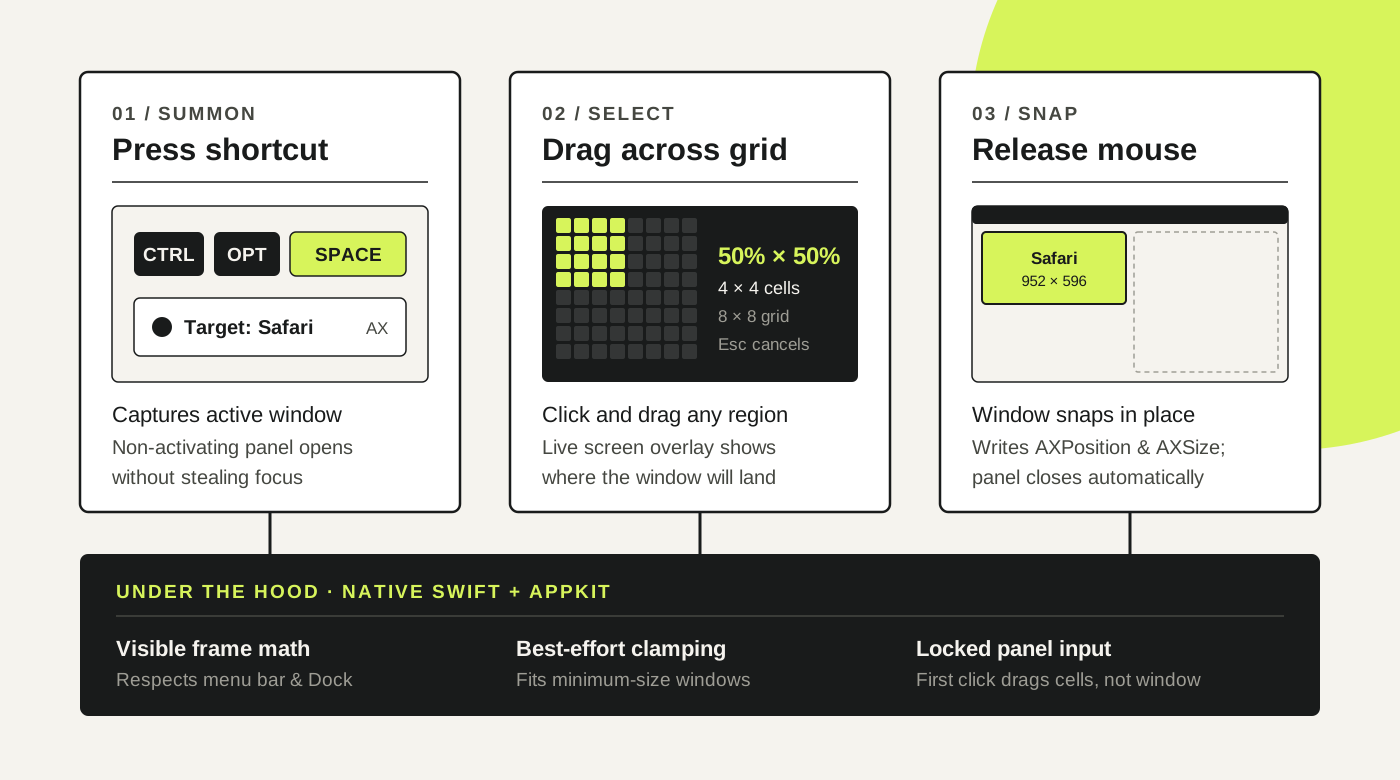
What made it a twenty-minute build wasn’t just that a model could write Swift and AppKit. It was that the agent could close the verification loop on the live desktop: compiling the bundle, opening a disposable test window, firing synthetic CGEvent mouse drags across the grid, and reading back the window frame through the Accessibility API.
When the first build failed in practice, every unit test had passed. AppKit’s default behaviour on a borderless NSPanel swallowed the first click and dragged the Gridlet window itself across the screen instead of selecting grid cells. Because the agent could drive the real GUI, measure the panel’s coordinates during the drag, and see the window move, it caught and fixed the input routing automatically.
My role shrank to taste and edge cases. I didn’t touch a line of Swift. I told it I only ever used the mouse drag so we could strip out keyboard preset scaffolding, asked for a cleaner UI pass, had it tighten up a sluggish screen-preview animation, and made minimum-size windows clamp as close as possible instead of throwing an error.
The remaining friction on macOS is code signing. Without a paid Developer ID and notarisation, an ad-hoc signed build changes its identity on every recompile, which makes macOS prompt for Accessibility permission again. And bespoke software still has no maintainer when Apple changes the OS underneath it. The difference is that when a twenty-minute tool breaks in three years, you don’t mourn it or hunt for an alternative. You just ask for another one.
Gridlet is MIT licensed, free, and on GitHub if you want to read the code or try it.